Aksara Studio
Experimental development surface
Studio's UI and internal APIs are experimental in v0.7.0 and are not the production administration contract. Keep Studio disabled in production. Use generated REST APIs, your application permissions, and the built-in Admin where appropriate for operational workflows.
Aksara Studio is an optional built-in web UI distributed with Aksara. It runs inside an application only after Studio is explicitly enabled.
Enable it with the settings below, start the app with aksara dev, then open
http://localhost:8000/studio/ui.
What is Aksara Studio?
Studio is a visual dashboard embedded in your Aksara application. It exposes selected model declarations, routes, retained diagnostics and experimental AI tools. Coverage depends on enabled features and current process state; it is not a complete live view of the backend:
- Model Browser — Inspect model declarations and field definitions
- Query Explorer — Inspect retained query traces and heuristic alerts; verify plan provenance
- Migration Manager — Inspect available migration metadata
- API Inspector — Browse your auto-generated REST endpoints
- AI Console — Use configured experimental AI providers for analysis
- Runtime Panel — View settings, connection pool status, and health checks
Studio docs vs AI Mode docs
Read the Studio docs for the built-in web UI, Studio endpoints, and Studio configuration. Read AI Mode for the AI Console, AI Flows, MCP tools, AI Debugger, Architecture Review, and Performance Analyzer that run inside Studio or connect to external agents.
Quick Start
1. Enable Studio explicitly
Studio defaults to disabled, including in debug mode. Set a local secret before constructing the app:
AKSARA_ENABLE_STUDIO=true
AKSARA_STUDIO_SECRET_TOKEN=replace-with-a-random-local-secret
AKSARA_STUDIO_REQUIRE_AUTH=false
2. Start Your App
3. Open Studio in Your Browser
Navigate to http://localhost:8000/studio/ui
That's it. Studio reads your app's live state — models, routes, queries, and migrations — all from the same process.
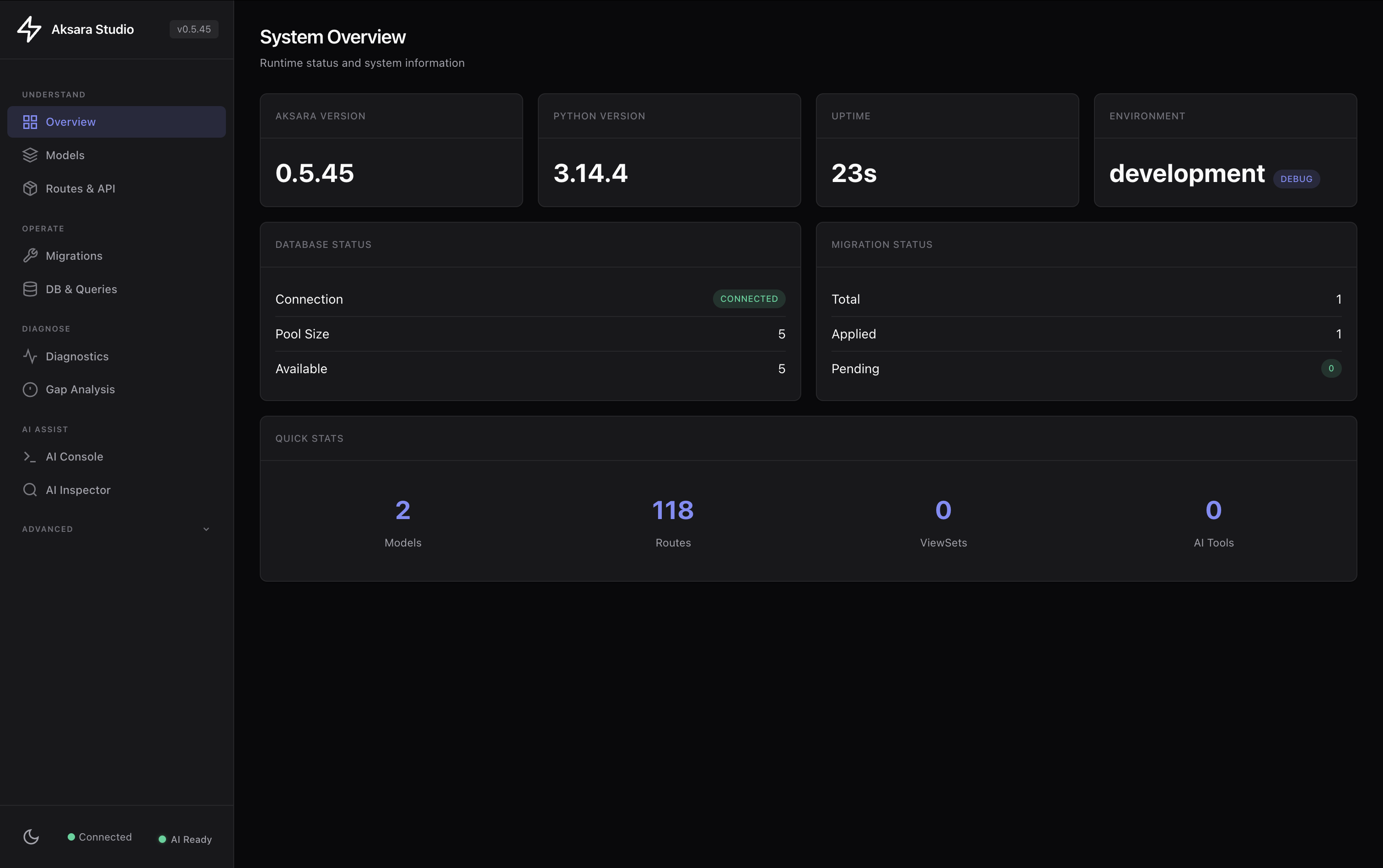 Studio System Overview — framework version, Python runtime, database connection pool, migration health, and live project statistics in one view.
4. Studio API Endpoints
Studio also exposes a JSON API used by the UI. These are available while your app runs:
| Endpoint | Description |
|---|---|
GET /studio/handshake |
Full project schema and route manifest |
GET /studio/context/summary |
Lightweight schema summary |
GET /studio/health |
Database and service health check |
5. CLI Utilities
# Test the handshake endpoint from the terminal
aksara studio handshake

# Print Studio endpoint URLs for your running app
aksara studio url
Documentation
-
:material-api: Studio API
Selected core Studio endpoints and access boundary
-
:material-console: CLI Commands
Command-line tools for Studio integration
-
:material-cog: Configuration
Settings and environment variables
-
:material-robot: AI Mode
Console, flows, MCP tools, and AI analysis features
Security
By default, Studio endpoints are disabled in every environment. In production:
- Leave
enable_studio=Falseto keep Studio unmounted. - To expose it deliberately, set both
enable_studio=Trueandstudio_expose_in_production=True, require authentication, and restrict origins and network access.
# Enable in production (requires explicit flag)
from aksara.conf import configure

configure(
    enable_studio=True,
    studio_secret_token="replace-with-a-random-secret",
    studio_expose_in_production=True,
    studio_require_auth=True,
    studio_auth_token="replace-with-a-separate-bearer-secret",
    studio_allowed_origins=["https://studio.mycompany.com"],
)
Next Steps
- Studio API Reference - Detailed endpoint documentation
- CLI Commands - Test and manage Studio from the terminal
- Configuration - Security and settings